
Hyperliquid · charting and trading · on every device
Draw the line.
Chart every Hyperliquid market with the indicators and drawing tools you know, then trade on that same chart. Draw stop, target and entry where you are already looking, say what you will risk, and the size falls out. Built for the phone first; no custody, and no account needed.
One fee, shown before you approve it: a 0.01% builder fee on each trade, paid through Hyperliquid.
Transparency
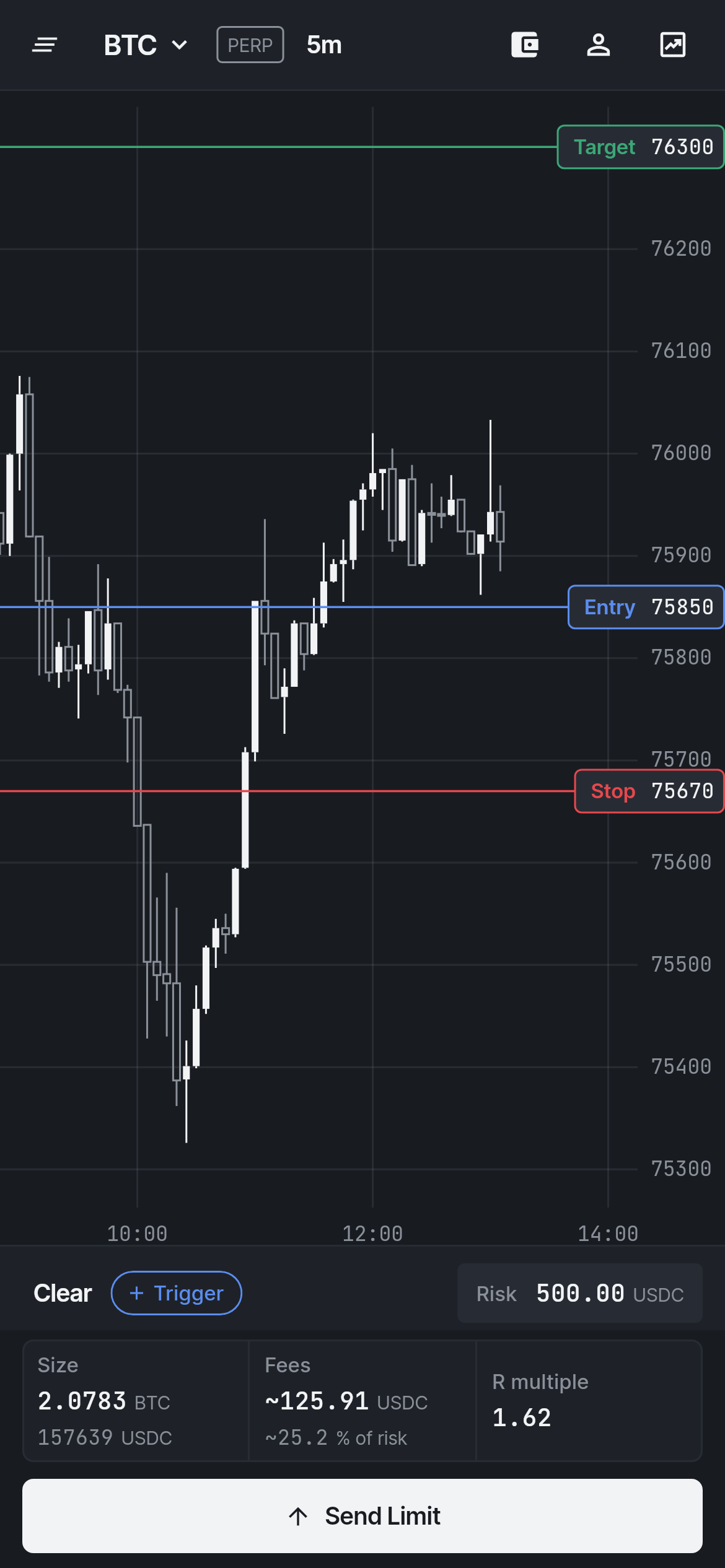
The real R.
Reward-to-risk worked out from the raw prices is not what you get paid. Graphite counts every fee — taker, maker, builder, funding — into the size and the R multiple before you send, and shows you the fees beside it.
What you see is what the trade is worth. Nothing hidden, nothing rounded away.
Charting
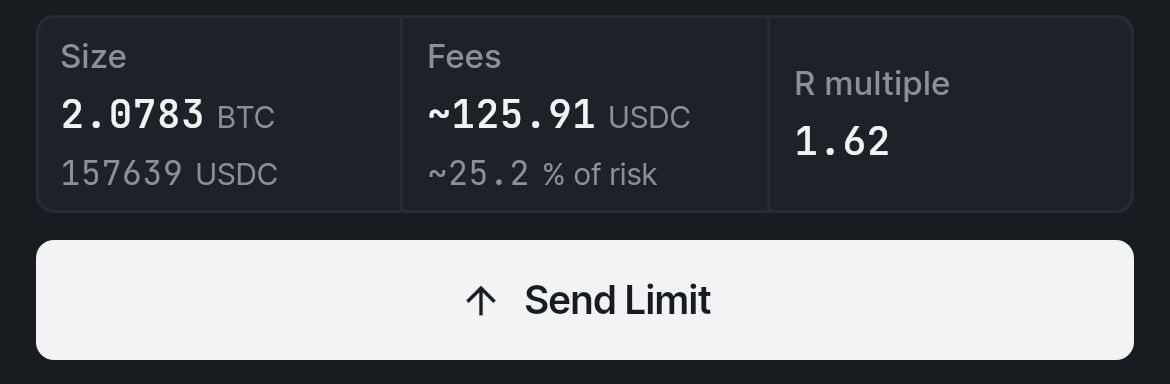
Chart it and trade it on the same chart.
Mark your levels in one tab, retype them into the exchange in another — or do both here. Graphite is a full charting platform for every market Hyperliquid lists, and the trade is one tap away: the Fibonacci level you drew is where you drag the stop.
Charting needs no wallet and no account.
- Every market
- Crypto perps and spot, and the stocks, indices and commodities that trade as HIP-3 perps. Candles or line, log scale, one minute to one month.
- Indicators
- EMA, SMA, WMA, VWAP, Bollinger, Ichimoku, SuperTrend, RSI, MACD, Stochastic, volume and volume profile — as many as you want, each one tunable.
- Drawing tools
- Trend lines, rays, horizontals, channels, rectangles, Fibonacci retracement and extension, text and measure, with a magnet to the candles. Kept per market.
- Watchlists, synced
- As many lists as you need, live price and change. An optional account carries them, your drawings and your settings to every device.
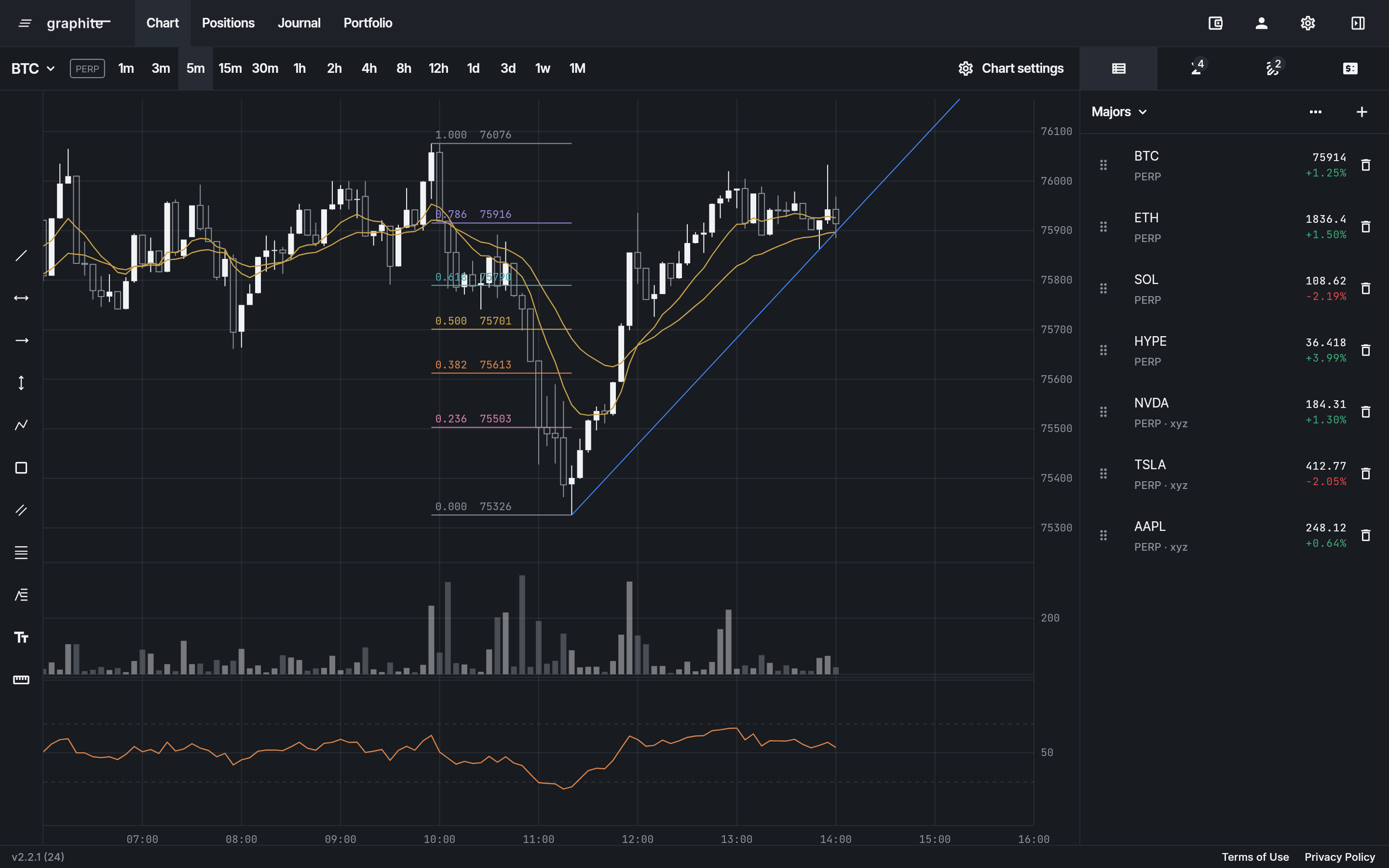
Chart-centered
One chart. Nothing else asking for your attention.
No order-book wall, no ticker carousel, no leaderboard, no feed. The chart is the app, not a panel inside it, and the tools fold away when you are not reaching for them.
Everything you need to place the trade lives on the price axis you are already looking at — and every number you need to judge it sits in one panel beside it.
Built for a thumb · Risk-first
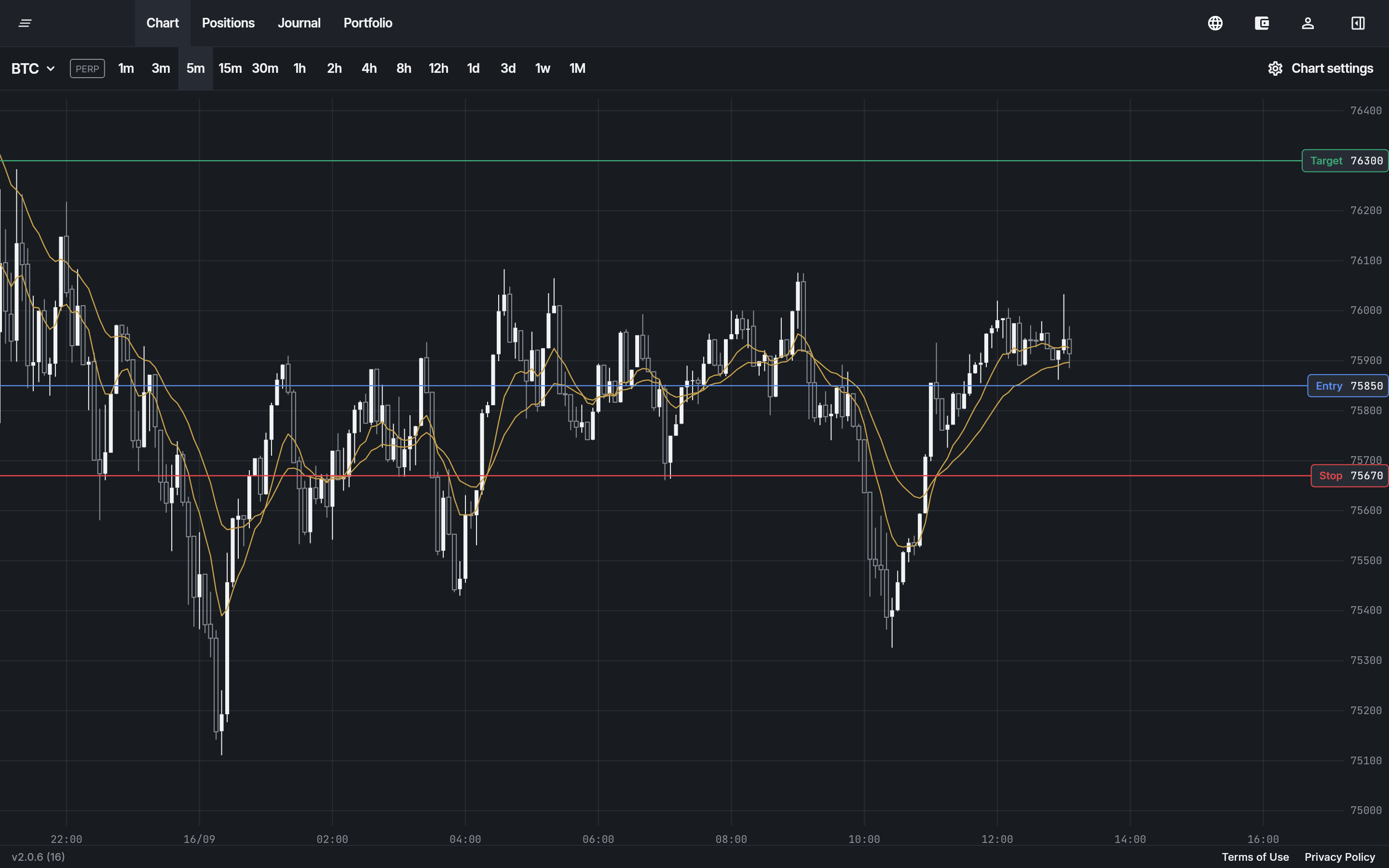
Drag your stop. The size follows.
Every exchange treats mobile as the desktop interface with the columns stacked: to set a stop you type a price into a field, on a screen where you can already see exactly where that price is.
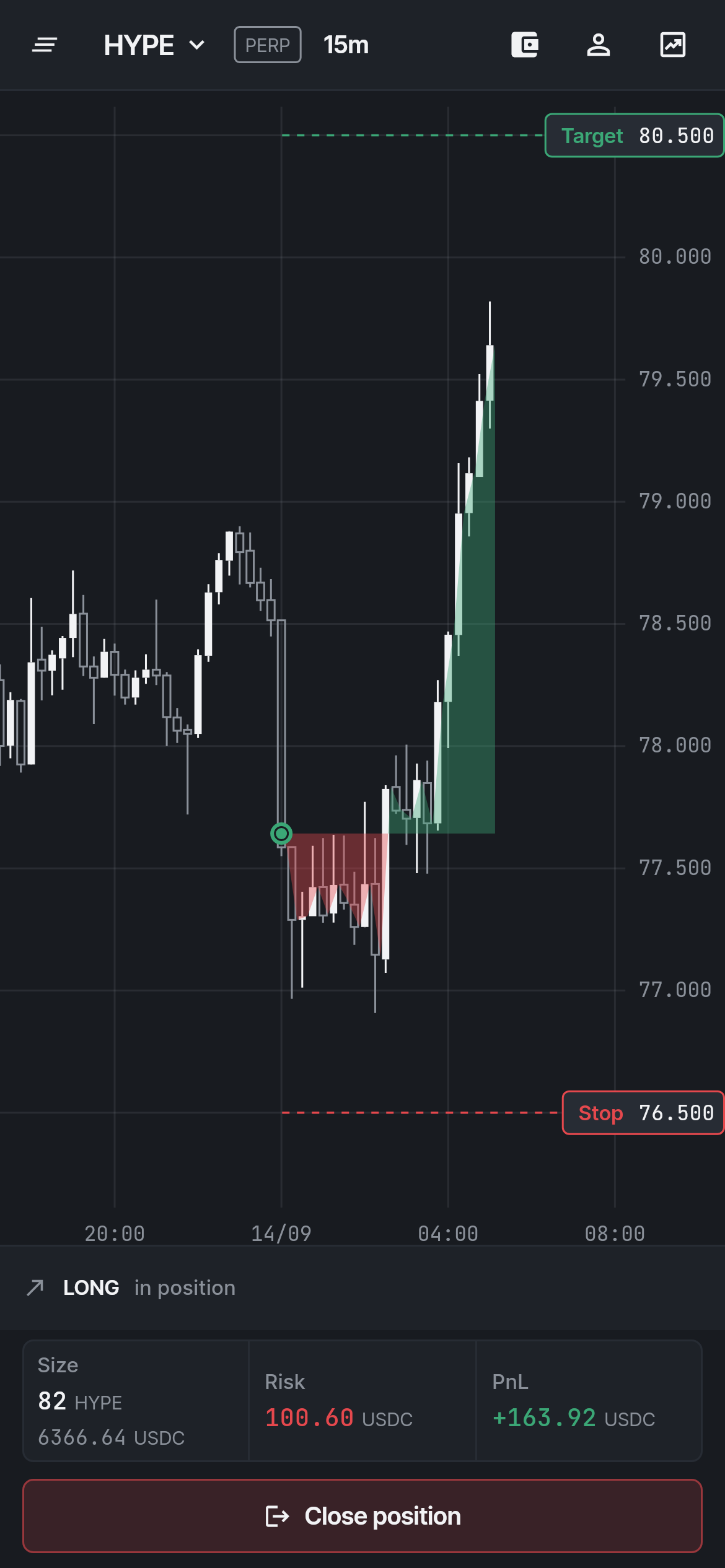
Graphite is built mobile-first. Take hold of the stop and move it with your thumb. The risk is the one number you set — in percent of the account or in USDC — and as the stop moves, the size, the fees and the R follow it, before you send. Never after.
Trading is won by not losing. The order starts from the risk: how much, and where you are wrong. The position size falls out of those two, instead of being picked first and the exposure discovered afterwards.
Scale out
Up to three take profits. The stop stays.
Add a second and a third take profit from the strip, each a step further, and give each its share of the position: half off at the first, the rest further on. The size, the fees and the R are the whole trade's, every take profit counted for what it closes.
The exchange holds every take profit from the moment you send, each with its share of the stop under it. When the first one fills, the rest of the position keeps its stop where you drew it, with the app open or closed.
Speed
Setup to filled in five seconds.
The market does not wait while you compute size. Pick the levels, pick the risk, send. Sizing, leverage and the orders are derived, so there is no arithmetic step and no second screen.
- 1
Long or short
One tap draws the trade: the stop 1.5 ATR away, the target at 2R. That is already a complete market order.

- 2
Pick the risk
Say what the trade may lose, in percent of the account or in USDC. Move a line and the size follows; the risk never does.

- 3
Send
Entry, stop and target go to Hyperliquid as one trade, signed on the device with no wallet popup. The drawing becomes live orders the moment the exchange echoes them.
After the fill
The plan stays on the chart. The record writes itself.
Once filled, the same lines are live orders. Drag the stop and the exchange is told; drop it on the entry and it snaps to break-even. The P&L runs from your entry to the price, the liquidation zone is drawn while it matters.
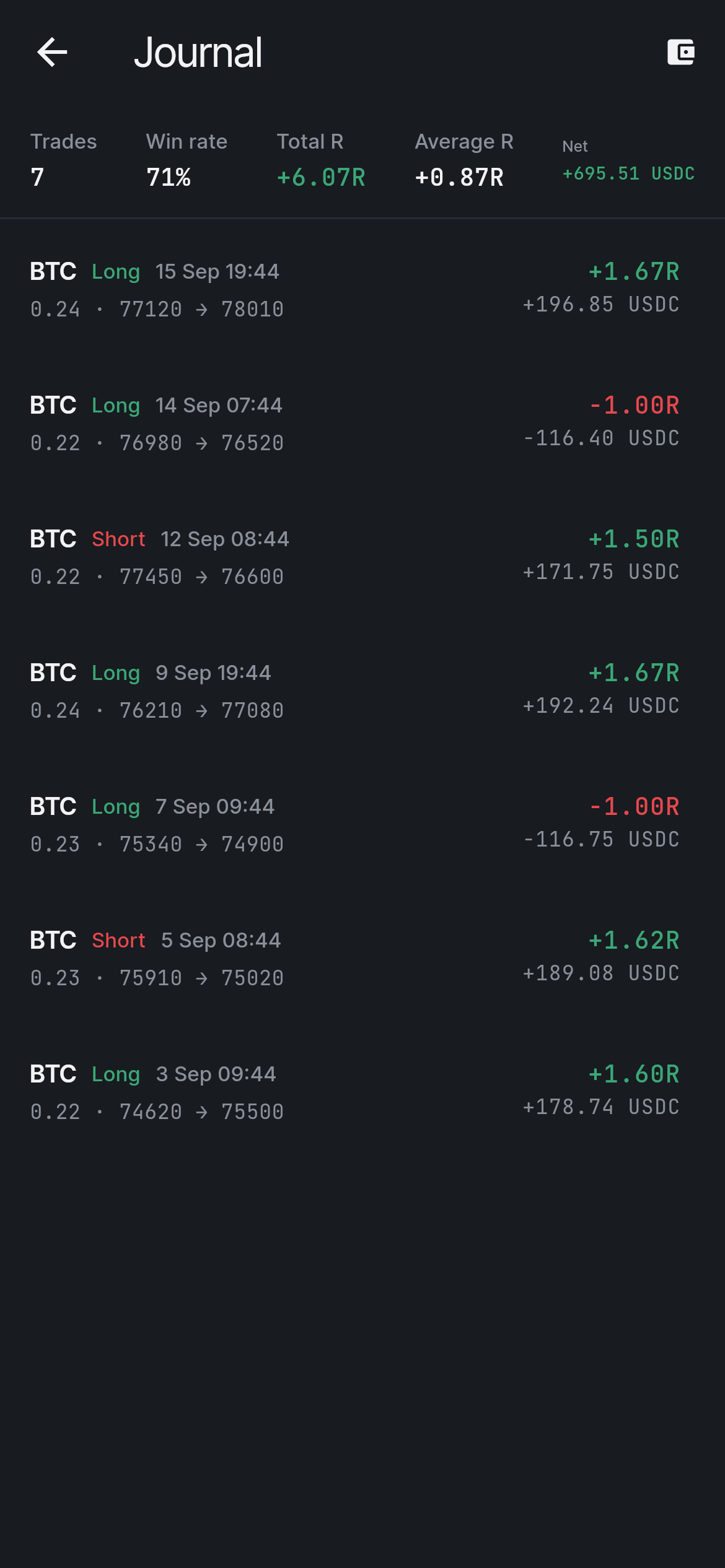
Every closed trade lands in the journal in R, net of fees, scored against the stop it was taken with — read straight from Hyperliquid, across the whole account.
Nothing that can trade is on our servers
No custody, no key on our servers — and the key itself can't withdraw.
You keep the funds
Your wallet stays your wallet. Graphite never touches deposits, withdrawals or transfers; your collateral sits on Hyperliquid, where it always did.
The trading key never leaves your device
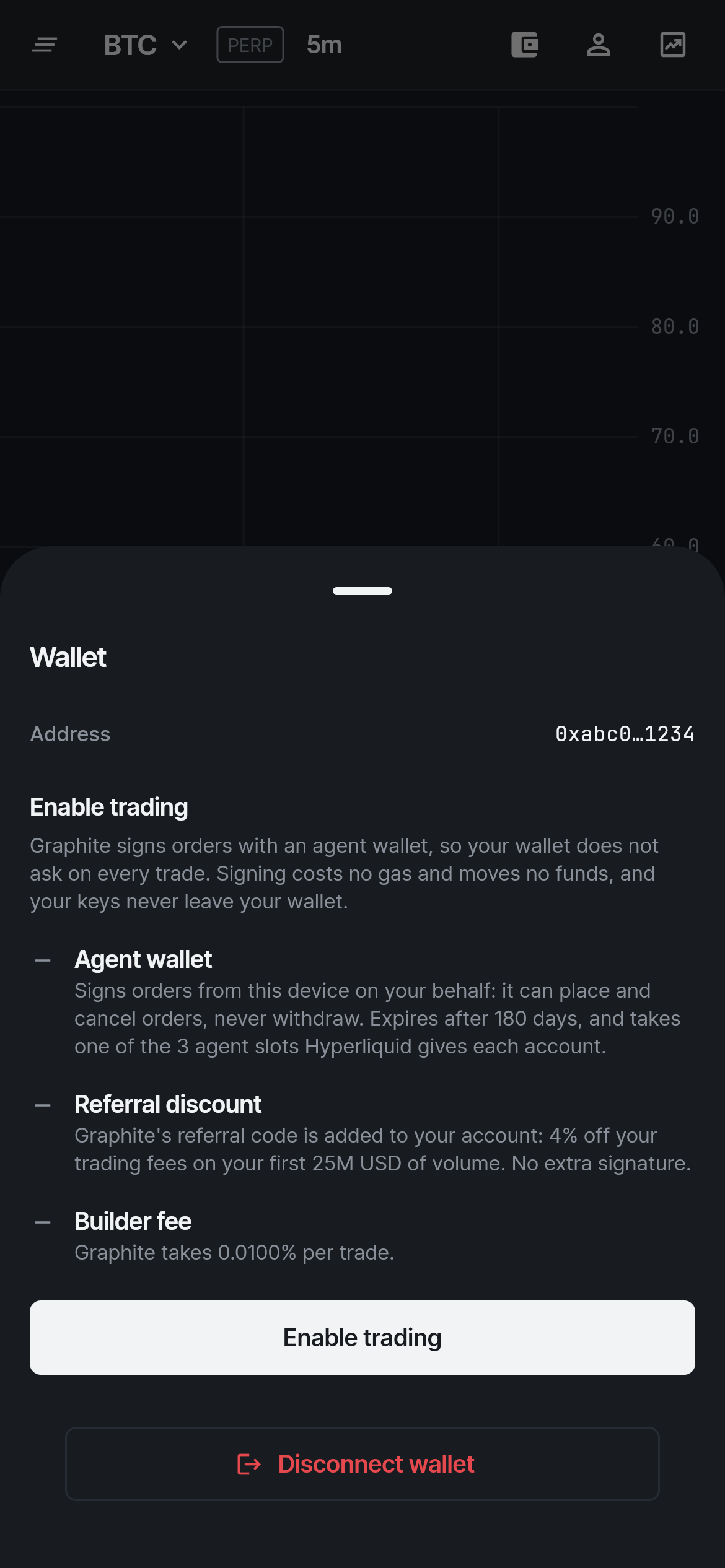
Orders are signed by a Hyperliquid agent key generated on the device and held in its secure storage. It is not sent to us and not recoverable by us. Pairing a second device moves it encrypted end to end.
Even the key is not enough
A Hyperliquid agent can place and cancel orders and nothing else. Whoever held it could not withdraw, transfer or move a cent — and one signature from your wallet revokes every device at once.
The account only holds your charts
A Graphite account is optional. It keeps watchlists, drawings and settings in sync, stored in the EU, and never records your wallet. The two stay apart, so whoever took one would have nothing of the other.
What it costs
One fee, and you can see it.
Graphite earns a builder fee of 0.01% on each trade — a fifth of what a wallet's built-in trading charges — collected by Hyperliquid alongside its own fees. You approve it once when you enable trading, and it is inside every figure the app shows. No subscription, no token, no other line.
What a trade costs, worked through ·Position size calculator
Builder address 0xf572FD4C076D6b0d7E32E010c021dd5B91f72845, referral code TRADERAFT.
Questions
Before you open it.
- Which wallets work?
- On the web, any injected EVM wallet — MetaMask, Rabby, Phantom and the like. On a phone, link from a device that has one: the app hands its trading key over a PIN-sealed QR code, and the phone trades the same account with no wallet installed.
- Which markets?
- Chart every market Hyperliquid lists: perps, spot and the HIP-3 stocks, indices and commodities. Trade the USDC-settled perpetuals, HIP-3 included; spot is charted, not traded yet.
- Do I need a wallet to use the charts?
- No. Charting never asks for one. A wallet is needed the day you want to trade, and the chart you drew on is the one you trade from.
- Do I need an account?
- Not to chart or to trade: a wallet is enough to trade. An optional Graphite account keeps your watchlists, drawings and settings on every device, and never holds the wallet or the trading key.
- Do I deposit with Graphite?
- No. Funds stay on Hyperliquid and move only through Hyperliquid. Graphite reads your account and places orders on it; it cannot withdraw.
- Is there an app store app?
- Graphite is a web app that installs to your home screen. Native shells will follow where the stores allow exchange interfaces.
- Can I use it from the United States?
- No. Graphite follows Hyperliquid's terms: not available to US persons or in sanctioned jurisdictions.